Guide to Feedback Screens in the MBTT EEG Neurofeedback Application
Contents
- Introduction & launching the application
- Input Parameters
- Feedback Parameters
- Working with the TO_DO Application (User Interface)
- Audio Feedback
- Breath Counting Functionality
- Report Functionality
Introduction
This guide is part of a set that teaches you how to use Mind-Body Training Tools for EEG neurofeedback. It builds on the foundation presented in the EEG Neurofeedback Training App User Guide (which you are strongly recommended to read first).
As described in the main EEG neurofeedback user guide, running a neurofeedback session in MBTT requires the practitioner to make two key decisions:
- what protocol to employ
- what form of feedback to use.
Protocols are described in the Guide to MBTT EEG neurofeedback protocols. This document covers the second decision, what form of feedback to use.
Feedback in its most general sense is information about how well you're performing some particular skill, that enables adjustments and improvements to the performance based on learning. More specifically, in neurofeedback training, feedback is what the software presents to the trainee to see or hear. Changes in this feedback convey the information that enables learning.
A key principle of feedback is that it should (ideally) help to motivate the trainee in some way, i.e. it should incorporate a reward for “success”. Having the experience of reward makes learning more efficient in some sense.
The main part of the guide describes the individual options that you can select from, but first we present a foundation that covers the different classes of feedback.
Conceptual Foundations: Classes of Feedback
To repeat, feedback is that part of the neurofeedback process which presents information to the trainee in some sensory form. Feedback can be visual, e.g. a graph that goes up or down, or a video, or a game. Or feedback can be auditory – a sound with varying volume or pitch. More specifically, changes in the EEG training parameter are reflected as changes in the visual or auditory presentation.
Reward or Punish?
A key principle of feedback is that it should (ideally) help to motivate the trainee in some way, i.e. it should incorporate a reward for “success”. The feedback should be pleasant, or desirable in some sense. Having this experience of reward facilitates learning, or makes it more efficient. For example, in simple video feedback, the video plays when the trainee is in the desired neurophysiological state, and stops when he drifts out of that state. We presume the trainee wants the video to play and not to stop.
Another way to motivate is to provide aversive feedback (which is unpleasant in some way) when the EEG training parameter moves in the “wrong” direction. Most neurofeedback practitioner training suggests not to use aversive feedback, but it could be argued it comes down to personal preference of the trainee. There is no doubt that aversive feedback or aversive feedback exists in nature and that animals can learn very effectively from it.
Also, some feedback is both rewarding and aversive at the same time - in our video example, the video playing is rewarding, and stopping is aversive. Which does the brain learn from? From a practical point of view it hardly matters.
Classes of Feedback
Whatever the medium of feedback, there are different classes of feedback:
- Dichotomous or Stop-go – our video example above is like this. Either the video is playing (when the parameter is above threshold) or it is stopped.
- “Points-based”. Feedback is a discrete event, such as the scoring of a point in a game, or a “pacman” eating the next cheese. The feedback event is triggered by the training parameter crossing the threshold (e.g. alpha amplitude exceeds 20uV).
- Proportional. For example suppose video is the medium of feedback, but this time the image brightness varies over a range. Instead of a discrete feedback event, (e.g. starting or stopping) the feedback is continuous but varies smoothly over a range. The video can be bright or dark or anywhere in between. This form of feedback mirrors the training parameter which also varies over a range.
There is no clear consensus in the field of neurofeedback as to which form works best. Probably a big factor is the personal preference of the trainee (whatever is the most engaging and motivating is likely to work best). Mind-Body Training Tools Neurofeedback app offers all three forms.
User Interface: Selecting a Feedback Screen
After setting up your protocol, click the ‘Run Training Session’ button. This opens a further dialog window:
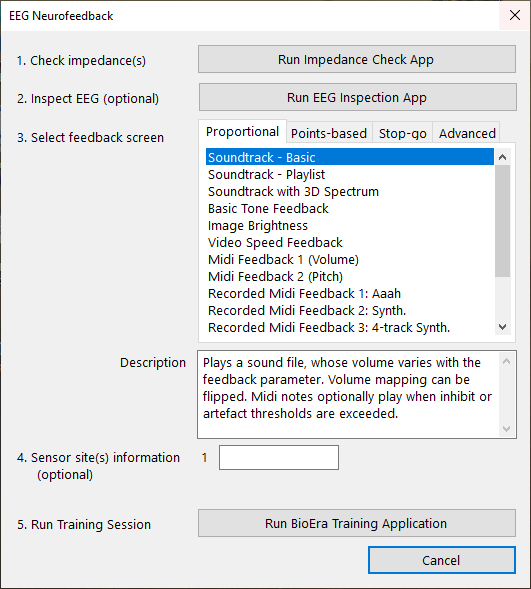
This dialog outlines the next five steps.
MBTT EEG neurofeedback training software is built around the concept of the protocol. A protocol describes what particular EEG parameter to train, and how. In the software a protocol is an explicit entity, having a name and several other attributes. When running neurofeedback sessions, a necessary first step is to select (or create) a protocol - you can't run a session without this step.
In neurofeedback, selecting the most appropriate protocol for any given client or trainee, is key to success. How to make that choice is beyond the scope of this guide - for that you need to take a training such as my Neurofeedback Practitioner Programme. For now, suffice it to say that the decision takes account of both the trainee's goal (or conversely the issues they'd like to overcome) and the particular patterns that manifest in the trainee's EEG (as measured and revealed by an EEG assessment).
Classes of Protocols
The preconfigured protocols in MBTT come in two classes: (i) basic (or standard) and (ii) advanced.
What distinguishes the two? Largely it comes down to feedback, or more specifically, how many independent feedbacks are available. To understand this, let's review the concept of feedback.
The Concept of Feedback
Working with More Than One Feedback Parameter
Suppose you're working with a protocol that involves training more than one EEG parameter, e.g. you want to train beta amplitude up, and theta amplitude down. In the software, you'd use two thresholds, one for beta amplitude and one for theta amplitude.
This is clearly more complex than just training a single parameter such as alpha amplitude. What does this mean for how we present feedback?
In principle, we have two choices:
- we can combine the two parameters into one, and present a single feedback as before, or
- we can independently feed back each parameter.
A Note on Terminology: Feedback Stream vs. Feedback Parameter
Now we are speaking of one feedback vs. two feedbacks, we need a new terminology to refer to this. I settled on "feedback stream". By this I mean the aspect of the actual feedback which is varying in a way directly perceivable by the senses. I want to distinguish this from "feedback parameter" which is the calculated EEG variable that gets mapped to the feedback.
Two feedback parameters could be for example theta amplitude and beta amplitude. Two feedback streams could be the brightness of a video and the volume of the video soundtrack.
Examples of Feedback
If we're using either stop-go or points based feedback:
- Combining into a single feedback stream would mean the feedback event is triggered by both threshold conditions being met simultaneously. For example, our stop-go video would play when beta amplitude is above its threshold level AND theta amplitude is below its threshold level, at the same time.
- Two independent feedbacks would mean that we could for example play two different contingent sounds; a high pitched piano note when beta is above threshold, and a low pitched note when theta is below threshold.
If we're using proportional feedback:
- Combining into a single feedback would mean we take an average of the two parameters, and feed back this average.
- Independent feedbacks would mean we could play two soundtracks simultaneously, one whose volume varied proportionally to theta amplitude, and a second whose volume varied with beta amplitude. The two soundtracks would have to complement each other: nature soundtracks work well in this respect. For example the sound of flowing water represents theta amplitude, and the sound of birds singing represents beta amplitude. It wouldn't make sense to use video feedback in this case because you can't really pay attention to both. However you could have video brightness linked to one parameter and video volume linked to the other.
Feedback
Feedback in its most general sense is information about how well you're performing some particular skill, that enables adjustments and improvements to the performance based on learning.
More specifically, in neurofeedback training, feedback is what the software presents to the trainee to see or hear. Changes in this feedback convey the information that enables learning.
Thresholds
Neurofeedback software must translate EEG parameters, or more specifically changes in EEG parameters, into feedback that is presented to the trainee's senses. Thresholds are software tools, that enable you to configure this mapping, meaning they define how much of the parameter results in how much feedback.
A “threshold level” is a marker of how much of the training parameter is enough to trigger feedback. This is perhaps easiest to grasp in the case of points-based feedback or stop-go feedback: when the parameter exceeds the level, a point is scored or the video starts playing. (You can of course train a parameter downwards, which would mean a point is scored when the parameter goes below the threshold level.)
Appropriate setting of threshold levels is key to using neurofeedback effectively. The main principle is that feedback should be balanced: not too challenging for the trainee, and not too easy.
In MBTT, you can set the levels “by hand”, or the software can calculate updates based on recent EEG data, and on criteria that you set.