About Heart Rate Measurement for HRV Biofeedback
Contents
Introduction
Several of the biofeedback applications within the Mind-Body Training Tools suite measure heart rate - they typically use it to calculate Heart Coherence data. The first task they need to perform is to take the raw data from the sensor / amplifier, and detect heart beats within this signal so that we can then calculate heart rate on a beat-by-beat basis (this is equivalent to saying the software measures each Inter-Beat Interval or IBI).
Heart Rate can be measured from two kinds of devices, either PPG or ECG which are described in more detail below, together with their pro's and con's.
This guide also covers how to check and adjust the calibration of the software for beat detection.
Devices & Device Types
As mentioned, the MBTT apps measure heart rate using one of two sensor types:
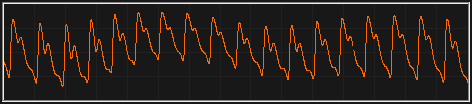
Photoplethysmograph or PPG sensor: this works by sending a beam of light through a finger (or alternatively the ear lobe). The amount of blood in the finger (ear lobe) varies over the cycle of the pulse, and it changes the way the light is either absorbed or passes through.
The raw PPG trace looks like this:
Electrocardiograph or ECG (sometimes EKG): works by detecting the voltage spike generated by the heart for each beat. The ECG trace over the cycle of the heart beat is called the PQRS wave, and the sharpest tallest section is the R wave - the software uses the R wave as the basis for beat detection.
The raw ECG trace looks like this:

ECG Sensor Placement
ECG is a voltage measurement, technically similar to EMG and EEG. In all cases you need three electrodes attached to the skin (or scalp in the case of EEG). Note that a medical ECG is quite different and a lot more complex. Medical ECG involves up to 12 electrodes and delivers way more information - in HRV biofeedback we only need the R to R interval, for which 3 electrodes is enough.
Two of the three electrodes are the "actives", plus and minus, while the third is the “ground”. The active electrodes need to be placed on opposite sides of the heart, but almost anywhere will do (for our purposes) - for example, one on each wrist (having the advantage of being convenient - no need to undress etc.) or one on each shoulder, or one on the forehead and one on the wrist (also quite convenient as it leaves one hand free).
For an ideal ECG we might prepare the electrode sites with cleaning etc. - this reduces the electrical noise in the signal. But for our purposes, some noise makes no odds - as long as we can clearly see the R wave spike, we can easily obtain the information we need. So in practice site cleaning and preparation is not usually important for HRV biofeedback.
Pre-gelled self-adhesive snap electrodes are very easy and convenient for HRV biofeedback, but I've personally, mostly just used dry electrodes held to the wrists using sweat bands. This is usually quite adequate.
PPG vs ECG: Pro's & Con's
The main advantage of using PPG is convenience - you simply need to fit the sensor to a finger or earlobe. However PPG is less accurate. This is inherent in the nature of the signal - the ECG R wave is a clear sharp spike, while the PPG pulse wave is rounded or more “blurred” in a sense.
If you're measuring heart rate for the purpose of HRV analysis, the loss of accuracy from using PPG is potentially more significant, but for Heart Coherence biofeedback, it probably doesn't matter.
Not every type of amplifier offers a PPG sensor, but any device that can measure EEG or EMG can be used for ECG - you simply use the EEG channel.
Device Selection
When you run a biofeedback session, you need to tell the software what type of amplifier (device) you have. In MBTT you do this from the device dialog, accessed from the Set-up tab of the Platform program.
There is a drop-down control for each physiological parameter, and the relevant one here is “Hear Rate Source”. Some devices offer both ECG and PPG sensors, and you must select the option for the one you're using. An example is the PhysioCom GP4, for which you'll see two entries in the drop-down, one for PPG and one for ECG.
The software then configures the heart beat detection algorithm accordingly.
Checking & Adjusting the Heart Beat Detection Algorithm
The software gives the user some opportunity to adjust heart beat detection to make it optimally robust and reliable.
Each MBTT application that measures heart rate, contains a button to check and adjust beat detection, looking like this (it's the one with the red “heart” icon):

Clicking on this button opens up a new window with the BioEra app showing the raw heart signal plus stages of beat detection. Please note, the only way to close this window is to click the same button that opened it.
If you're using an ECG device, the raw signal window looks like this:

If using a PPG device, it looks like this:
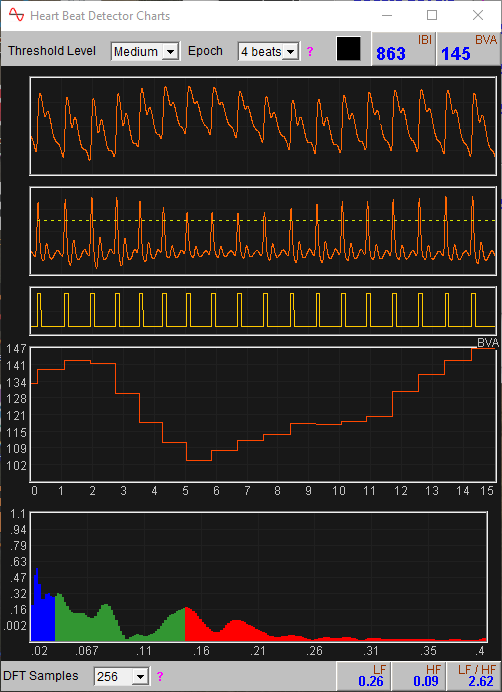
Beats are detected when the raw signal crosses a threshold or limit, which is shown as a dotted line in the charts (either PPG or ECG). This threshold line is adjusted by the software dynamically (continuously), based on where the raw signal has been over the preceding few seconds.
Things can go awry either by missing beats or by detecting extra “beats” which aren't really beats. Beats can be missed if the threshold line is too high, and extra beats detected if it is too low.
You can adjust the threshold level higher or lower using the threshold level control. You can also change the period of time used for the calculation of the threshold level using another drop-down control.
The amplitudes of both ECG R wave and PPG pulse wave do vary over time, which is why the beat-detection threshold level must be dynamic. Moreover the variation depends on the individual. The best strategy is to experiment to see what settings of the drop-down controls work best in practice.